The Compound You're Forgetting: How Degraded Thermal Interface Material Is Quietly Eroding CPU Performance Across Your Server Fleet
Every year, enterprise IT organizations invest heavily in processor upgrades, workload rebalancing, and power efficiency initiatives. Procurement teams negotiate hard on TDP ratings. Engineers benchmark core-to-core latency. Architects debate memory bandwidth trade-offs. And then, somewhere between the CPU socket and the heatsink, a thin film of thermal interface material — applied during initial server assembly and never touched again — quietly turns into a liability.
Thermal paste, or more formally, thermal interface material (TIM), is not a component that appears on most IT asset management dashboards. It carries no firmware version. It generates no SNMP alert. It does not show up in a hardware inventory scan. Yet its degradation over time directly affects processor junction temperatures, which in turn drives thermal throttling behavior, shortens component lifespan, and undermines the efficiency metrics that modern IT teams are under increasing pressure to optimize.
For US enterprise deployments running high-density server configurations — particularly those pushing workloads associated with AI inference, virtualization, or real-time analytics — the cumulative impact of degraded TIM across even a modest fleet can translate into meaningful, quantifiable performance losses.
Understanding What TIM Actually Does — and Why It Fails
The surface of a CPU heat spreader and the base of a heatsink are not perfectly flat at the microscopic level. Even precision-machined metal surfaces contain microscopic peaks and valleys that, when pressed together, trap air — one of the worst thermal conductors available. Thermal interface material fills those gaps, creating a continuous conductive path that allows heat to move efficiently from the processor die to the cooling assembly.
Most server-grade systems ship with either a factory-applied TIM pad or a pre-dispensed silicone-based compound. Under sustained thermal cycling — the repeated expansion and contraction that occurs every time a server powers on, ramps under load, and cools down — these materials undergo physical and chemical changes. Silicone-based compounds can dry out and develop micro-fractures. Polymer-based pads can lose elasticity and compress unevenly. Over a three-to-five-year operational window, which aligns closely with standard hardware depreciation cycles in US enterprise environments, the thermal conductivity of factory-applied TIM can degrade by a measurable percentage.
The result is a gradual increase in CPU package temperatures under equivalent workloads. Modern processors respond to elevated thermal readings through a mechanism known as thermal throttling — dynamically reducing clock speeds and voltage to stay within safe operating parameters. In a well-managed data center, this process is nearly invisible. Workloads slow slightly. Latency increases incrementally. Power draw adjusts. None of these changes are dramatic enough to trigger conventional alerting thresholds, but they accumulate across every affected unit in a fleet.
Why Routine Audits Miss This Entirely
Standard enterprise hardware audits are designed around discrete, detectable failure states. A failed DIMM produces correctable error counts. A degraded NVMe drive surfaces SMART attribute changes. A failing power supply generates event log entries. TIM degradation produces none of these artifacts.
What it does produce — elevated steady-state CPU temperatures under load — is frequently misattributed. IT teams may interpret rising thermal readings as a consequence of increased workload density, ambient temperature changes in the data center, or airflow disruption from cabling modifications. Without a baseline thermal profile established at the time of server deployment, there is no reference point against which to measure drift.
Further complicating detection is the fact that most infrastructure monitoring tools aggregate thermal data at a relatively coarse level. Knowing that a processor package is running at 85 degrees Celsius under load is useful, but without context — what was it running at eighteen months ago under comparable load? — the figure is difficult to act on.
Some organizations have begun incorporating thermal delta analysis into their quarterly hardware review processes, comparing current steady-state temperatures against deployment-era baselines stored in their CMDB. This approach can surface TIM degradation as a pattern across specific server models or age cohorts, enabling targeted remediation rather than fleet-wide intervention.
Calculating the Remediation ROI
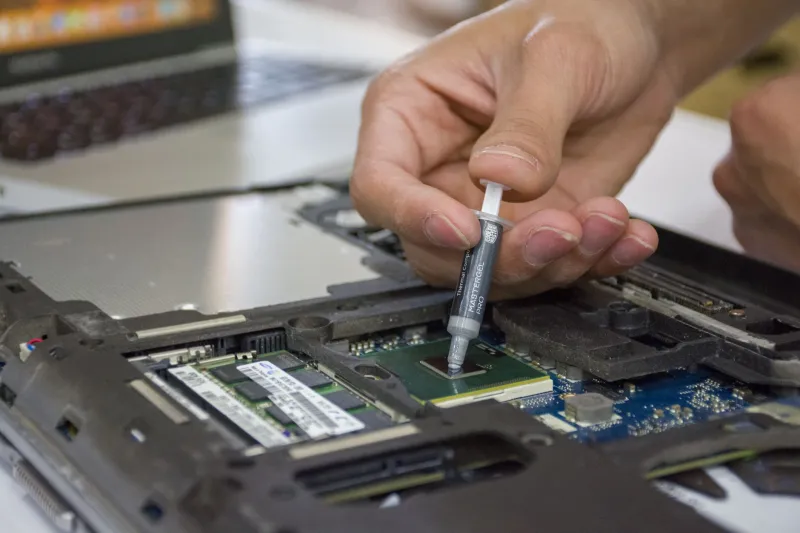
The cost of re-applying thermal interface material to a server CPU is not trivial in an enterprise context, but it is also not prohibitive. The material itself — high-quality, server-grade TIM from reputable vendors — is inexpensive. The labor cost, however, requires careful accounting. Proper TIM replacement involves powering down the server, removing the heatsink assembly, cleaning both mating surfaces with isopropyl alcohol, applying fresh compound in the correct quantity and pattern, and reassembling the thermal stack. In a colocation or hyperscale environment, this process also involves coordinating downtime windows and potentially migrating active workloads.
The ROI calculation depends heavily on the severity of thermal throttling observed and the criticality of the affected workloads. For servers running latency-sensitive applications — database query processing, real-time fraud detection, or high-frequency API endpoints — even a modest reduction in sustained clock speed can translate into measurable service degradation. For batch workloads with softer SLAs, the calculus is different.
What makes the ROI case compelling at scale is the alternative: early hardware retirement. Sustained operation at elevated temperatures accelerates electromigration within processor circuitry, increases capacitor stress on the motherboard, and can trigger premature failure across multiple components simultaneously. Extending the productive life of a server cohort by twelve to eighteen months through a scheduled TIM refresh program may represent significantly more value than the labor cost of the intervention itself.
Building TIM Refresh Into Your Maintenance Calendar
Leading hardware maintenance frameworks are beginning to treat thermal interface material as a scheduled consumable rather than a set-and-forget component. The practical recommendation emerging from thermal engineering literature and field service data suggests a TIM inspection interval of approximately three years for servers operating in standard data center conditions, with earlier intervention warranted for systems running consistently high thermal loads or operating in environments with elevated ambient temperatures.
For IT teams looking to implement this practice, the starting point is establishing thermal baselines at deployment. Record CPU package temperatures under a standardized load profile — a controlled benchmark run that can be repeated consistently — and store those figures in your asset management system alongside the server's other deployment-era specifications. This creates the reference data needed to detect drift during future audits.
From there, incorporating a thermal delta check into annual hardware reviews requires minimal additional effort. If a server's steady-state temperature under the standard load profile has increased by more than a defined threshold — many engineers use eight to ten degrees Celsius as a meaningful signal — it becomes a candidate for TIM inspection and replacement.
A Small Material, A Large Oversight
The irony of thermal interface material in enterprise IT is that its low cost and physical invisibility have allowed it to remain outside the structured maintenance thinking that governs virtually every other server component. Organizations that would never defer a firmware update or ignore a degraded storage controller are routinely allowing the thermal efficiency of their processors to erode unchecked over multi-year deployment cycles.
As US enterprises continue to push processor utilization harder — driven by AI workloads, consolidation mandates, and sustainability targets that demand more compute per watt — the margin for thermal inefficiency narrows. The compound between your CPU and its heatsink may be the least glamorous item in your data center, but for IT teams serious about extracting full value from their hardware investments, it deserves a place on the maintenance checklist.